Over the past four years as an Instructional Coach, I sent out monthly newsletters to the teachers with which I worked. I collected all sorts of resources for them in a Wakelet collection throughout the month, then sent a link in an email at the beginning of the month, then began collecting resources for the next month. I loved doing this! Each teacher (or team) sets student achievement goals for their classroom (or grade level). I would try to incorporate their goal in my searches so I could help them in meeting their goals. Wakelet is great for newsletters, as you can set up columns, one for each category. You can then place links under each category. Here's the last Wakelet newsletter I sent out in May/June. If you'd like to see my whole collection, here's a link to that. And, if you'd like more information about how you could use Wakelet with your students, there are a lot of possibilities! Here is a link to their page on Wakelet for Education. If you scroll to the bottom, you'll find even more goodies! Enjoy!
Thursday, June 22, 2023

Monday, May 29, 2023
It's been a hot minute since I posted! In August of 2019 I took a position as an Instructional Coach within my school district. I love my job working with our amazing teachers! I get to observe them in their classroom and reflect with them, reminding them of all the great things they are doing with their students!
Cognitive coaching is definitely a skill which took time to get used to, and some teachers really prefer to have a more direct approach - tell me what I did which was good, and what I need to improve upon. Cognitive Coaching is more than that. It's about having teachers reflect on their own practice, getting them to see those skills for themselves. Unfortunately, our schedules are so tight, it's hard to do coaching justice in the amount of time we have.
One of my favorite parts of my job is to share with others what I've seen in other classrooms. We do Peer Visits in our district. Our certified staff are required to do 1 peer visit, and then have an optional 2nd Peer Visit (this is all part of our Q Comp system). When teachers ask who they should visit, I ask them what they want to improve on in their practice. Because I visit around 110 people, I have a lot of amazing people for them to observe from birth through fifth grade!
I will try to continue updating what I've been working on as an instructional coach over the next few weeks. It's been a busy four years!
I hope you're having a great day!
Best,
Gloriann
Saturday, February 9, 2019
Flipgrid and Kindness
Today I want to share a fun Flipgrid activity I made for my students. Kindness needs to be shared, and often, right?! Well, this Flipgrid activity will get them excited to show many people in your building how they can be kind!
First, I will read, Try a Little Kindness, by Henry Cole. Any book about kindness would be awesome, but I really like this one!


After the story, my students will get this Flipgrid BINGO game board! Each space has a picture of a person or place in our school building! My students can scan the form at the top, and either show something they've made for someone to show kindness, or tell something they've done to show kindness to someone or in that area of the building when they go to our topic grid, Kindness. I will put this Google doc in our Google classroom, so they can also click the links in each box, which will also take them directly to our Flipgrid. We have 5 Chromebooks and 8 iPads, so my 23 students can take turns with this activity when they are done with other assignments.
I hope this inspires you to try something kind with your students using Flipgrid!
Saturday, April 21, 2018
Wipeboards
But first... When I logged in to write this today, I have to say, I know it's been a long time since I blogged, but WOW! Way too much time has gone by! All I can say is, it's been a really long, trying year! I'm sorry I haven't been a very faithful ambassador for several great organizations, and I've been trying some fantastic products, too! I have some wonderful firsties this year, but they are making me earn. my. keep! 😅 As we say in Minnesota, "Ooftah!"
Today I want to tell you about a great classroom lifesaver I've been using for large groups, which can also be moved to my small group instruction. It is call the Wipebook Flip Chart. It is awesome! The charts come with 10 sheets! One side has 1" grids (PERFECT for people like me who write uphill all the time) and the back side is blank. Think about the possibilities for graphing in math, and drawing shapes with symmetry using the grids! YES! The blank side is great for my students to have for writing words during Daily Five, when they do not have to worry about lines.
Each page has holes for hanging, which the rings go through on my stand. They are very durable with the cardboard encasement. Here are a few pictures to see how I use it in my room:


Since we were working on a long-term weather unit and going to be researching, I needed to leave choices up for a period of time. The words were on the Wipeboard for over 2 weeks. This is where even more of their awesomeness comes in!
 If you have something you want left up for longer, after about 7-10 days, the marker dries and becomes more permanent, but can be wiped away EASILY with Expo White Board Care. Here's an example:

I want to also show you how you can move it around the room! The back is pretty sweet. It is made of cardboard, but folds out on the sides and bottom for added support when you want to move it to the floor or a table for small group instruction.
The tabs that hold them on the chart are easy to release without any tools. You can clip them up anywhere in the room, or leave them on the cardboard stand.

I stated earlier that I shared Wipeboard Flip Chart pages with my colleagues. I don't have pictures from their classrooms, but they are using theirs in similar ways. Some use magnets to hold theirs on their scratched whiteboard stands, others have magnets holding theirs to their chalkboard. The feedback from my peers was the same as mine - two thumbs up! We love Wipeboard Flip Charts!!!
Give Wipeboards or Wipebooks a try!
Sunday, July 16, 2017
Genius Hour Update!
I had promised my students we'd work on Genius Hour (G.H.) projects during the spring. That became increasingly impossible after the first week I was home for two reasons - 1. The school year would end on May 16th for us this year, due to a building project within the district (our high school is being redone!!!); and 2. I just could not push all of this onto a substitute. It is exhausting and overwhelming to do Genius Hour. I absolutely love it and it is TOTALLY worth it, but I go home each day during their choice project time and have my family pull me out of my car and drag me up to my bed (That's when I am HEALTHY!). If you're thinking, "I don't think I'll do G.H. now", DON'T THINK THAT!!
Here's why I love Genius Hour so much:
1. Students work so hard for projects they believe in.
2. I use Flipgrid to have my students "Pitch" their ideas for their projects. This is great, because they have to think about what they want to do, do some research to make sure it's viable, write a little script from which to practice, then record their pitch on Flipgrid. Students who don't otherwise have a voice, DO! Flipgrid is awesome, and with G.H., those quiet, shy students have a chance to voice their opinions in a more private way - I.heart.flipgrid!!
3. Students who may not write for other assignments are writing pages for you - without your reminders and prompts.
4. The level of engagement is FANTASTIC! The level of energy in my classroom during G.H. is electric! I can't even begin to think of the best way to explain it, but I've never seen students - ALL students light up with excitement as much!
5. Students shine when they get to present their projects. I use an iPad on a stand to record the students, then load their video into Seesaw to share with families, and even post on our Seesaw blog. At times, I'll even do a live Tweet. In the past, I've used Periscope directly to share happenings in my classroom - now it's even easier with it being embedded within Twitter! Gotta love simplified living!!
So this spring...Here's what I ended up doing....
I read the book, What Do You Do With a Problem,

I wanted to replace the project with something fun, and would be something we could do over the course of several weeks. I had already planned the idea of making things out of cardboard boxes and had collected boxes, but had not settled on the actual project until we read the book together.
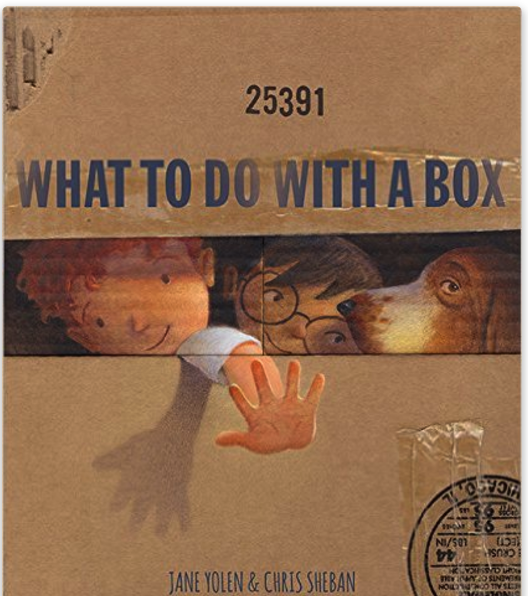
Here's the book we read: What to Do With a Box While we read it, the wheels started turning, and one of my students suggested he might make a car. To piggy-back, I suggested a "what-if" - what if we all make some type of car and have a drive-in movie theater in our room and watch a movie during the last week of school? That was it! It was decided and we were all hooked! Paper plates and fasteners were purchased for wheels and steering wheels. Personalized license plates were crafted - one was, "The Best" (pronounced The Beast 😉). Oh, the fun we had!!!! Here are some pictures in stages!

We had a real assembly line going with the boxes! I was able to purchase 21 boxes from a local business, Drop and Go so all of my students had the same sizes to start with, and the boxes were blank on the outside.

We got water bottle donated from Tri-County Water in Hutchinson. The water was so refreshing!

We watched the movie, Sing! The cars were rockin' with a few of the tunes! 😉
So that's what how the end of the year ended for us with Genius Hour. I'm sorry this post was so late!
I've been busy prepping for the NCTE WLU conference later this week in Tucson, AZ!! My friend, Cassie Froemming and I are presenting at one of the symposium sessions! I'll throw a post up about that later! I'm so excited to have a chance to share all of the great things I've been doing with my students in first grade!! Whoot-Whoot!!
Sunday, February 12, 2017
Participate

1. I.heart their tweet deck!! They have SOOOO many chat groups (over 500!!!) already to go on a calendar! If you don't already see yours, you can add it! Chatting through Participate is so easy. Once, I had trouble getting online with them - I thought I was going to quit Twitter chats if it was going to be that hard without Participate. Seriously.
2. When you're done chatting, everything you've talked about and all resources collected through the chat can be curated in your account at Participate! FOR. REAL!! AND....you don't have to type your #hashtagchat each time you want to post something! Have I sold you yet?!
3. You can create collections of your own, or find items within Participate to add to your collections. For example, my school uses Literacy by Design for language arts. I add to it by curating videos to help teach themes. Instead of trying to remember where I saved my videos on my computer, I simply save them within Participate, in a collection I created for Literacy by Design. I have other collections for math, sea turtles, Black History Month, etc.
I have to confess that I accidentally deleted my Literacy by Design collection a while ago, so I recently recreated it. Oopsies. Luckily I knew what I had in there! It does happen, and it was my fault!
4. You can also collaborate with other Participate users! There are chat windows you can open and have dialog with other users. For example, I may want advice from someone on what else to add to my Black History collection. I can invite other users, then ask them what I'd like to know. They reply back on their own time, similar to Twitter Direct Message, Facebook Messenger and emails.
5. Customer Service is fantastic! If you have a problem or an idea to improve their service, please feel free to share it with them! The staff at Participate are THE BEST!
6. It's a free site, yes, but that doesn't even factor in for me.
So....have I convinced you to give them a try yet? Here's my advice:
Start with an account. You can create an account with email, Google+ or Twitter.
Join your favorite Twitter chat group for a few weeks and you'll be hooked! You'll have Participate.com bookmarked on your computer toolbar, or always open, like me. 😊
But please don't stop there! After you've gotten comfortable in chats, start a collection or two, and invite others to join Participate, too! Participate is a place for many to do just that - Participate! It is a verb - a vibrant, active place for teachers to come together to collaborate and work together, creating wonderful materials and resources for students worldwide!
I will blog more about their awesome Professional Development courses and badges soon, but I have run out of time for today. My family duties call...aka laundry is stacking up, dishes, vacuuming, etc.

Tuesday, January 31, 2017
Conference Symposium Application Overwhelmed!
Poor Cassie has had the most Miserable cold EVER! Between meeting in person, Facebook messenger and Google Docs, we hammered out all the details.
I know the next one will be easier, but symposium writing...lesson plans for an awesome group of 1st graders...hmmm... 😊
I'm sorry it's been too long since my last post! Boo!!! Coming soon, I promise!! I've got great things to blog about!!! Here are a couple of sneak peeks at two of them:
Participate
Flipgrid
If you don't have accounts with either of them, head there now! I'll be blogging about these great sites and the awesome potentials for you and your planning/students!
Sunday, November 27, 2016
Blogging in My Classroom with Seesaw
Click here to see Matson's Game

It was an awesome way to share his learning, in a personal way, and he felt very empowered! This was "HIS" site! He must have posted 6-8 videos ending with, "Thanks for watching."
Now, after reading the article on taking risks, I told my students I want them all to use their Seesaw account as their personal blog. We will still only post their best work, but what a great conferencing opportunity this creates for myself and my students! We can view their work together and decide if it should go "live" into their account. Sometimes I happen to see them recording live, so I can approve the work without having to view it a second time, but we usually do, as a lesson in editing (you never know what the sound quality is like, for example).
We are first graders. Our videos are far from perfect. Sometimes saying goodbye at the end of videos gets silly. Cameras zoom in and out, faces get really close to the cameras, voices change during the last 10 seconds of recording. It's all a part of creative expression and style - and learning what your audience wants (or what your teacher will tolerate, lol). Time to talk about building digital footprints!
By the way, I will blog about the video you watched - the math lesson I did with my students - later. It was FANTASTIC!!! :)
Happy Blogging!!!
Sunday, October 30, 2016
Lessons Learned in Genius Hour Studies

I did not think I would have WiFi issues. We were the only class in first grade, and very likely the only ones using WiFi in our building (10 classes of 1st grade and 9 classes of kindergarten). The time of day we do Genius Hour is between 2:00-3:00 on Fridays. The high school and the middle school are done at 2:20. The bandwidth should have been pretty open. BUT.... only about 1/2 of my kids could get their videos to load. I did eventually get everyone able to view his or her video, but it took until 3:05 - time to pack up to go home - before we got everyone done! INSERT SAD FACE HERE!!
Lessons learned - always lessons learned!
1. Plan on having around half of the students go online at a time. The other half of the students can be researching with books, looking for pictures to add to their work, drawing features, or working on another project.
2. Pre-teach a few students how to help problem-solve basic problems which may come up. For example, how to access the file (some forget how to find their video, and end up watching someone else's video). This will save you lots of time, and help your students feel empowered!!
3. Teach two students a new technology tool, and have them teach two students, and so on... Again, empower, empower, empower! You do not have 21 brains, 21 mouths and 42 hands to help them all in the time frame they want. I've been there! This technique will limit the number of questions you will get tenfold! This last Friday, I used this technique to teach my students how to take screenshots, and how to upload the photo to Seesaw. It took me 3 minutes to teach two students. Like wild fire, they taught the class and told others to teach someone else after they'd practiced it. Will they have it perfect? Not everyone. Will they remember it the next time they need it? Most will, but I will have to remind a few.
I will make a book of experts for each of the apps. The kids can see who the "Go To" kids are for each app. Eventually, we will be able to offer our expertise as "Kid Tech Team" for our building, helping other classrooms when needed and asked.
4. Here are some examples of the QR code helpers I use, the guides my students use (if they want)for animal research, and some "live" Genius Hour projects in progress. We will work 1 more time researching before we put our research into a presentation, using Shadow Puppet Edu. You'll notice in my students' journals that they've cited (or it was on a previous page I didn't photograph) the book they used for their research. I've made it very clear, even at the first grade level, the importance of citing work. It may not be APA format, however, lol!


All of my students listed the facts they knew about their animal first, before they picked a book from the library. This student listed all he knew about cardinals first on the paper, then as he learned NEW facts, he added them onto post-it notes. I modeled this procedure for them using bats as an animal to research. I wrapped up the research phase last week, and will model how to make a presentation in Shadow Puppet next week.
Shadow Puppet is not the only way my students can present their learning, but for their first project, I want all of my students to learn one complete process the same. After this Genius Hour project is complete and everyone has shared his or her project with the class, I will model different ways to share projects - I'll save that for a different blog post! :)


This is my go to for great animal researching! I have the students bend the paper back, so only 1 QR code shows at once. You just need to have a QR reader loaded on your device. I have QRJump on the iPads. There is a Chromebook extension for a QR code reader if you use Chromebooks, and QR readers are available on android platforms as well.

The next pages are from a great friend and master teacher, Sabrina Peterson. She shared them with us when she worked in our school a couple of years ago. I miss her so much!!


Reflection is always important for teachers to do. After each lesson I do this - with the students and again after they are gone. I asked them about the problems we had, and if there were any things we learned from our frustrations. One of my kiddos said, "It's ok, Mrs. Heikes. Sometimes it's like our Smart Board. It's an ornery board. So we just had ornery iPads today." Patience is a virtue! Bless his heart!! We learn from each other every single day!
Sunday, October 16, 2016
Genius Hour Resources
So, I am posting my favorite sources tonight! :)
If you have students researching animals, here are my top 3 choices:
National Geographics - Kids
A-Z Animals
San Diego Zoo for Kids
If your students are looking for projects to make, here are a few sites:
DIY - for kids
Instructables
You Tube -You may find videos for your students yourself, but remember to put it into SafeShareTV for them to view safely.
I will post a few other resources my students are trying out for me - after we use them. We are trying a more guided Genius Hour project for our first project this year, so my students know HOW and WHAT to report and share. I will post samples of their work this next week, as they are working on their projects on Monday. They are very anxiously waiting for Monday to come! They were able to choose any animal to research. I modeled the process with bats. We wrote on post-it notes (thank you, 3M!!!) and put our notes in columns - CAN, ARE, HAVE. As we learned NEW information through reading books, we added new post-it notes with the info. listed, but the post-it notes were of a different color. This helps my students visually see we learn new information. Next week we will look at our notes and see if some of our original ideas of bats were true or false. If the notes were false, they will be eliminated.
At the end of each working session, I will have my students take a picture of their journals and talk about what they learned that particular day, and what their next step would be. This is something I was missing last year, and I learned from Angela. Webinars, Twitter chats and other blogs are great ways to learn from each other!
Keep learning and keep moving forward! :D
Sunday, July 10, 2016
Genius Hour Wrap-Up
Here are a few pictures of our projects, and a few closing thoughts for next year.
 Some of the projects were green screen technology-based. We used DoInk for them, though the large production was hard to do in DoInk, so I ended up with it in iMovies. This is just one of the scenes we shot. My student's Genius Hour project was actually directing the movie. She caste the movie, developed the props (with help of her classmates and her final approval), and then ran the production. She was adorable! If someone forgot lines, she would duck under the camera and run to them to whisper the lines to each of the actors.
https://app.seesaw.me/pages/shared_item?item_id=item.9b8250f8-fd04-4acf-a0fe-a3faef3de525&share_token=s5q40kzWTPaoMMecqR6CmQ&mode=share

 Two students painted with acrylics. At the beginning, one of my sweeties called her canvas her, "easel". So much learning went into the project, including mixing, color temperatures, which parts to start with, and most importantly, our guest artist stressed the importance of creativity!!! Huge thanks to Tara Kilian, former colleague and dear friend who took time out of her day to come and spend it with my students!
This young fellow wanted to learn how to weld! Yes, weld! He'd already had some experience, so going to the high school to do some hands-on welding was certainly a treat for him!


 I invited a staff member who
is a master gardener in to work with two of my students who wanted to learn about gardening. My students looked through books to decide what they wanted to plant, then I went to Walmart and took pictures of their seed racks. I let them choose which variety of seeds to choose from the pictures, if there was choice (color of flowers, variety of carrots, etc.). She would stop every couple of weeks to check on the plants and make sure they were doing ok, thin them out with my students, and let them know what to watch for next.


 We had many sewing projects. Luckily, I had a parent who was willing to come in and volunteer her time and talent. While she is a stay at home mom, she is also busy sewing diapers for stillborn babies. She sends them to hospitals all over the United States, donating them. They had a stillborn baby themselves, and saw the need and felt the desire for helping other parents through such a difficult time. Just a side note. as we don't always get to hear what our students' parents do for work, let alone for hobbies and interests. She rapidly became a superhero to me!! She came several times, bringing her sewing machine each time, and her two little ones, who were incredibly well-behaved!! She even took a project home to work on, to get it almost completed so we could put the final stitches in at school during the last few days (we knew we were not going to get it completed otherwise).
 In addition to this wonderful mom, I had a high school helper who was a wonderful seamstress as well. She helped on the days she came (every Tuesday and Thursday). She also helped with the green screen productions while I monitored behaviors and video taped other projects.


https://app.seesaw.me/pages/shared_item?item_id=item.58dcfc53-50a5-4154-b16c82a3a50d51e2&share_token=v4k1bSl_Tsatxgz33aP8vQ&mode=share


Two of my boys wanted to learn about the Vikings. They did research of different plays, how many players are on the field at one time, how many games they play, and things like that. Because so many classmates were doing projects, we decided to have them make pennants, so they had something to take home as well.


https://app.seesaw.me/pages/shared_item?item_id=item.b82cc86c-45e2-4900-8e2d-2f9134da049a&share_token=ndCNce2zS5SAm1f27ocDKw&mode=share
This student wanted to learn how to build a robot. When he found that would be just a little too ambitious for a Genius Hour project at school (too costly for us, for one, too time consuming for another), he began looking through the robotics book for an alternative project. He found a recycled pop bottle car project in the book, but it had no directions. He researched it on YouTube, made a list of all the materials we would need, and we began collecting materials. The only item I needed to buy was the motor (which ended up being too heavy for the car). His Genius Hour helper is one of our IT technicians for our district. He had a blast, as did my student! If you watch the video clip, you'll notice the battery had run out of power. I ran and got a new battery, which worked, but the car still didn't run very well at school. My student and his dad worked on it at home, and with changing the aerodynamics of the fan on the car, they got it to work much better!!
Other projects not shown included more green screen projects with Leogs, Minions, and Avengers; a tie blanket for a student who moved shortly after we began Genius Hour, and research on an angel shark.
I kept the materials which were donated and were not consumable. Most of the students understood that next years students would be using the materials for their projects as well.
At the end of the school year, I asked my students to complete pages in Seesaw to document their "Favorites" during the year. Here's just a couple samples of favorite things we did in our classroom. Many students said Genius Hour was their favorite part of their whole year this year. They loved the projects they got to choose for themselves.


Genius Hour was a success for many reasons
* I let the students choose their projects
* Students helped each other, but asked first if they could
* We connected with families, community and staff from other buildings to complete projects, building upon their knowledge and strengths
Things I will do differently next year
*start sooner with a more controlled project first
-I want to teach my 1st graders how to become good researchers, to know where to best look for answers with a controlled subject so when they choose their projects, they will have a solid base to turn to.
* Broaden my community involvement in the projects my students choose (depending on the subjects, of course)
*Try to blog the culminating data and photos sooner and more often. I believe sharing with other teachers is important. We learn from each other.
I hope this has been helpful!! Feel free to email or tweet me with questions!